
You want a habit tracker that lives where you already work, costs nothing, and covers more than 30 days. This is that file: a free Google Sheets habit tracker template, with a matching Excel version, built to track one full year.
Key takeaways
 Free download in two formats: a Google Sheets habit tracker and an Excel habit tracker, no signup.One file per year: 12 month tabs, an overview, an instructions tab, and a start tab.Check off habits daily and the sheet charts your completed tasks and per-habit percentages for you.In a 2016 meta-analysis of 138 studies, physically recording progress made people measurably more likely to reach their goals (Harkin et al., 2016).
Why track habits in a spreadsheet at all
Because recording progress works. A 2016 meta-analysis covering 138 studies and nearly 20,000 people found that monitoring goal progress reliably improves goal attainment, and the effect got stronger when progress was physically recorded rather than just noticed (Harkin et al., 2016). A habit tracker sheet is exactly that: a physical record you fill in every day.
Spreadsheets have practical advantages too. You already own the tool, your data stays yours, and nothing hides behind a subscription. An Excel habit tracker also survives every trend; the file you download today opens fine in ten years.
One honest limitation up front: a spreadsheet won't remind you of anything, and it can't reward you for showing up. More on that at the end.
Download the free habit tracker template
Grab whichever version fits your life. Both are identical in layout, and both are completely free, no email, no macros, no locked cells you have to fight.
| Google Sheets | Excel | |
|---|---|---|
| How to use | Open the link, go to File, then choose Make a copy to save it to your Drive. | Open the link, go to File, then choose Download to get the .xlsx file. |
| Download 2026 | Download 2026 | Download 2026 |
| Download 2027 | Coming soon | Download 2027 |
One quick heads-up on the Excel version: the online preview behind the link looks a little broken, that's just Google Drive struggling with the formatting. Download the file and everything looks the way it should.
One file covers one calendar year. When January comes around again, download a fresh copy and start clean while keeping last year's file as your archive.
What's inside: 12 month tabs plus an overview
The file opens on a start tab, followed by a short instructions tab that explains every element in two minutes. Then come 12 month tabs, January through December, and a monthly overview tab that summarizes each month's results side by side, so you can compare how your months went.
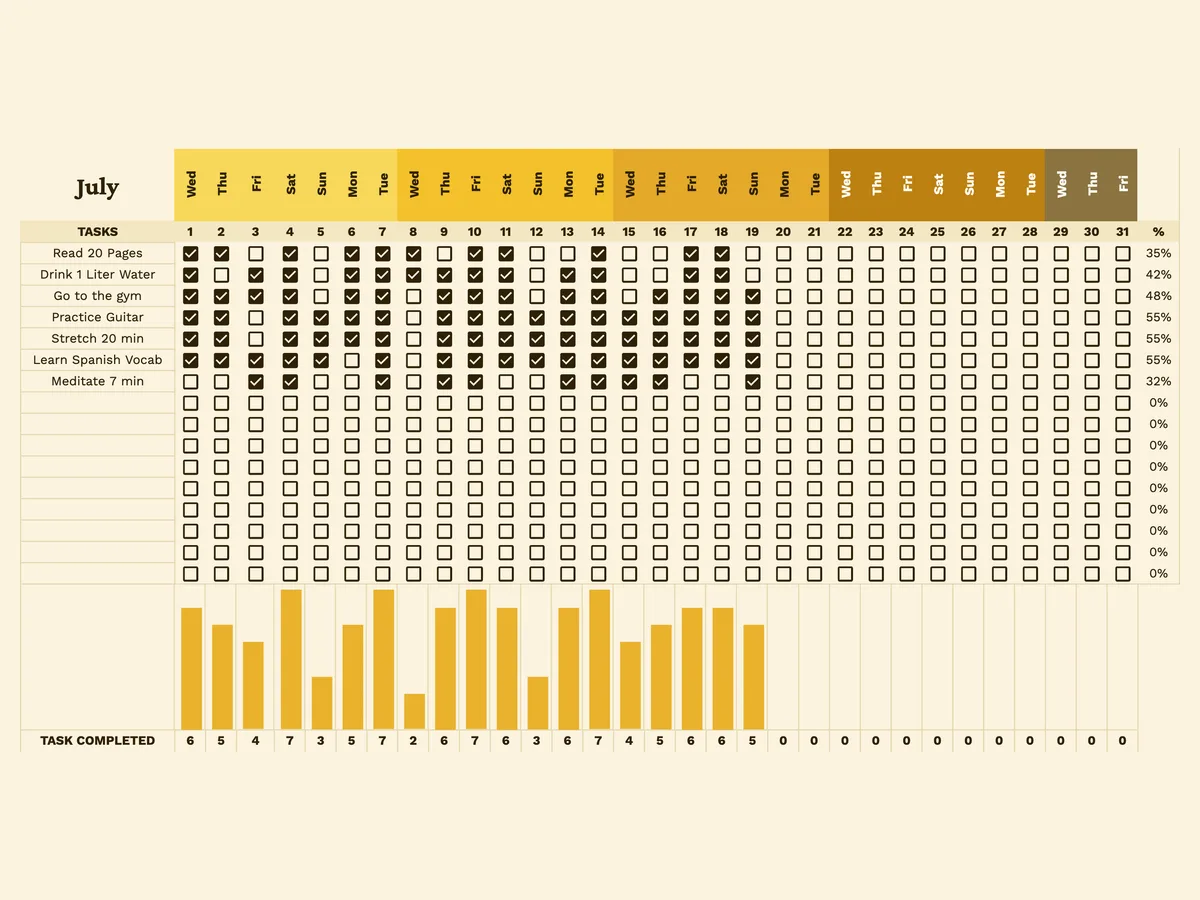
Each month tab follows the same layout. Your habits sit in a task list on the left, with one checkbox for every day of the month. The day columns are grouped by week in warm gold tones, so you can read a week at a glance without counting columns.
How the tracker works day to day
Type your habits into the task column once, then just check boxes. That's the whole daily routine, ten seconds at most. The sheet does the math from there, in three places:
- Daily completion chart: a bar chart along the bottom counts how many tasks you completed each day, so strong days literally stand taller.
- Per-habit percentage: the column on the right shows how consistently you completed each habit that month. Read a book every single day and it shows 100%; make it to the gym six times and it shows your honest number.
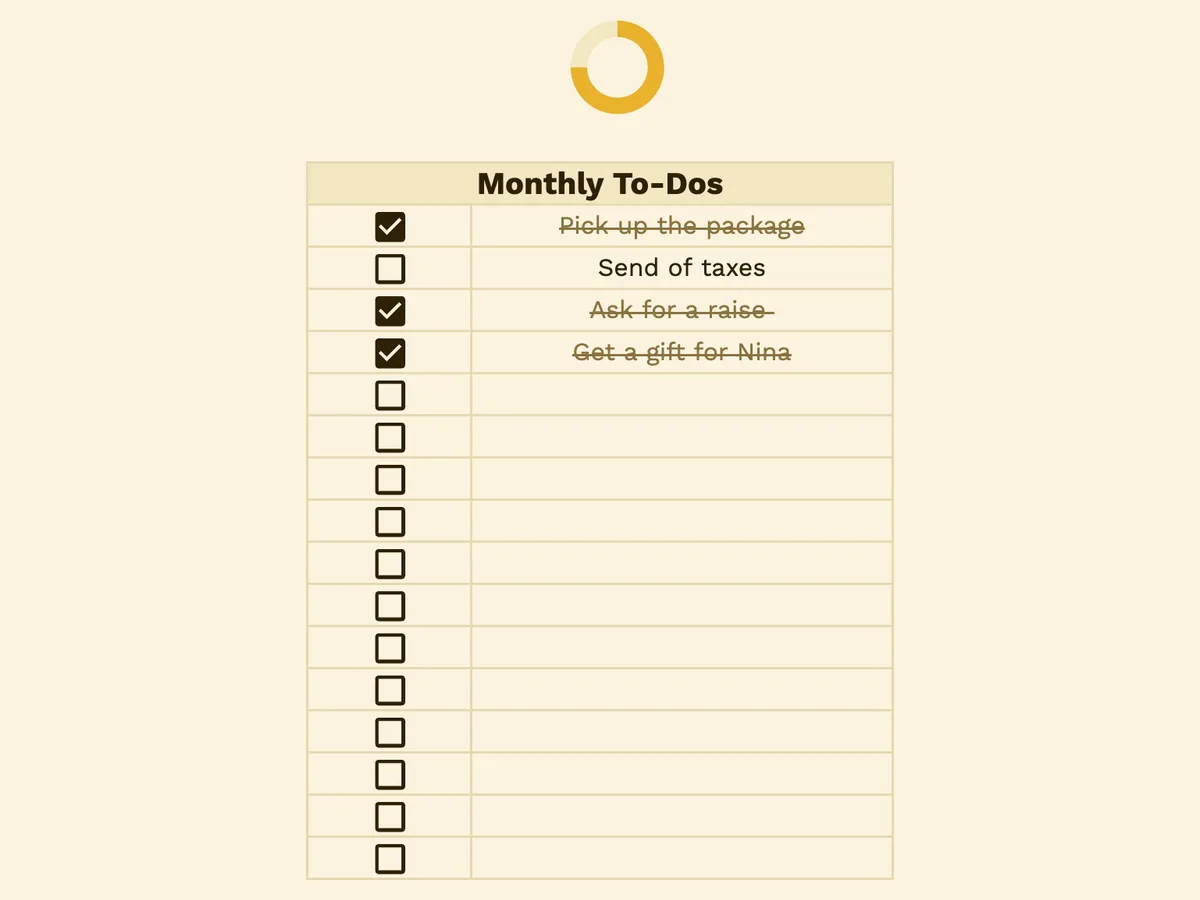
- Monthly to-dos: the panel on the far right holds one-off tasks that aren't habits, like booking a dentist appointment. Check one off and it gets crossed out.
Notice what's missing: streaks. In the classic 2009 UCL habit study, missing a single day had no measurable effect on habit formation (Lally et al., 2009). A percentage tells you the truth without punishing one bad Tuesday.
Getting the most out of it
Check the sheet at the same moment every day, ideally right after a fixed anchor like your morning coffee. Research on self-monitoring consistently ties higher tracking frequency to better results (Burke et al., 2011). The habits you log daily are the habits that move.
Start small. Three to six habits is plenty for month one; a task list of fifteen rows mostly produces guilt. Add more once your percentages hold steady.
And give it time. In the same UCL study, new habits took 66 days on average to become automatic, with a range from 18 to 254 days (Lally et al., 2009). That's exactly why this is a yearly file and not a 30-day printable.
Chase the trend, not perfection. A habit that goes 40%, 55%, 70% across three months is a success story. A single perfect week followed by a blank month is not.
Could you build a habit tracker in Google Sheets yourself? Sure, and it's a fun afternoon. But the checkboxes, charts, and percentage formulas here are already wired up, so you can spend that afternoon actually doing the habits.
When a spreadsheet stops being enough
A spreadsheet records your behavior; it doesn't change it. There are no reminders, no reason to open the file on a low day, and a checked box pays you nothing.
That gap is why we built Spend Your Habits. Every habit you complete earns coins, and you spend those coins, guilt-free, on rewards you picked yourself. Same daily checkmark, except now it buys your Friday night pizza.
From checkboxes to coins
Spend Your Habits keeps the part of the spreadsheet that works, the daily checkmark, and adds the part it can't do: a payoff. Each habit has a coin value you set by difficulty, and each reward has a price. A good week funds your treats; a lazy week doesn't.
You also get what no sheet can offer: reminders on your phone, streaks with freezes you can bank, and stats that follow you everywhere. If the tracker above gets you consistent, this is the upgrade that keeps you there.